


Your customers are talking to ChatGPT about your brand right now. Some of them click through and visit your website. Almost none of that shows up in Google Analytics 4. That mismatch, between AI's growing influence on buying decisions and GA4's inability to attribute it, is the single biggest measurement gap in 2026.
This guide shows you exactly where AI search traffic from ChatGPT, Perplexity, Gemini, Copilot, and Claude actually lands in GA4, why most of it gets dumped into "Direct" or "Unassigned," and how to set up tracking that gives you the real number. If you are investing in AI search optimization or content writing and reporting flat results because GA4 cannot see them, this is the fix.

The Problem: AI Traffic Is Invisible by Default
When a user clicks a link inside a ChatGPT or Perplexity answer and lands on your site, GA4 receives the visit but rarely receives a useful referrer. Three things go wrong simultaneously.
First, AI platforms strip referrer headers. ChatGPT's desktop app and many in-app browsers send empty referrers, which GA4 logs as (direct) / (none). Even when a referrer makes it through, it usually points to chat.openai.com, perplexity.ai, or gemini.google.com, domains GA4 does not recognize as search engines.
Second, GA4's default channel grouping has no AI Search channel. Traffic from chat.openai.com gets bucketed under Referral, not Organic Search. Traffic from in-app browsers becomes Direct. Citations that pass through bing.com/copilot confusingly get logged as Bing organic, even though the user never saw a traditional search results page.
Third, agentic browsers and AI assistants increasingly run JavaScript headlessly. Some AI-driven page fetches register as visits but never trigger the events you depend on for attribution. The result: a brand whose name appears in 60 ChatGPT answers per day might show as "no AI traffic" in GA4. The traffic exists. The signal is just buried.
Where AI Traffic Actually Lands in GA4
Here is the breakdown of where AI referrals land in a default GA4 setup:
| AI source | Default GA4 attribution | What it should be |
|---|---|---|
| ChatGPT web (chatgpt.com) | Referral / chatgpt.com | AI Search |
| ChatGPT desktop app | Direct / (none) | AI Search |
| Perplexity web | Referral / perplexity.ai | AI Search |
| Google AI Overviews | Organic / google | AI Search |
| Google AI Mode | Organic / google | AI Search |
| Microsoft Copilot | Referral / copilot.microsoft.com | AI Search |
| Gemini | Referral / gemini.google.com | AI Search |
| Claude.ai | Referral / claude.ai | AI Search |
| You.com | Referral / you.com | AI Search |
| Brave Leo | Direct / (none) | AI Search |
| Arc Search | Direct / (none) | AI Search |
| Kagi Assistant | Referral / kagi.com | AI Search |
Notice the pattern: a third of AI traffic is misclassified, another third is invisible, and only the remaining third lands somewhere useful. The fix is to build a custom channel group that pulls them all together.
Step 1: Create a Custom Channel Group for AI Traffic
Custom channel groups in GA4 let you define rules that re-categorize traffic. Here is how to add an AI Search channel that captures all the major AI referrers.
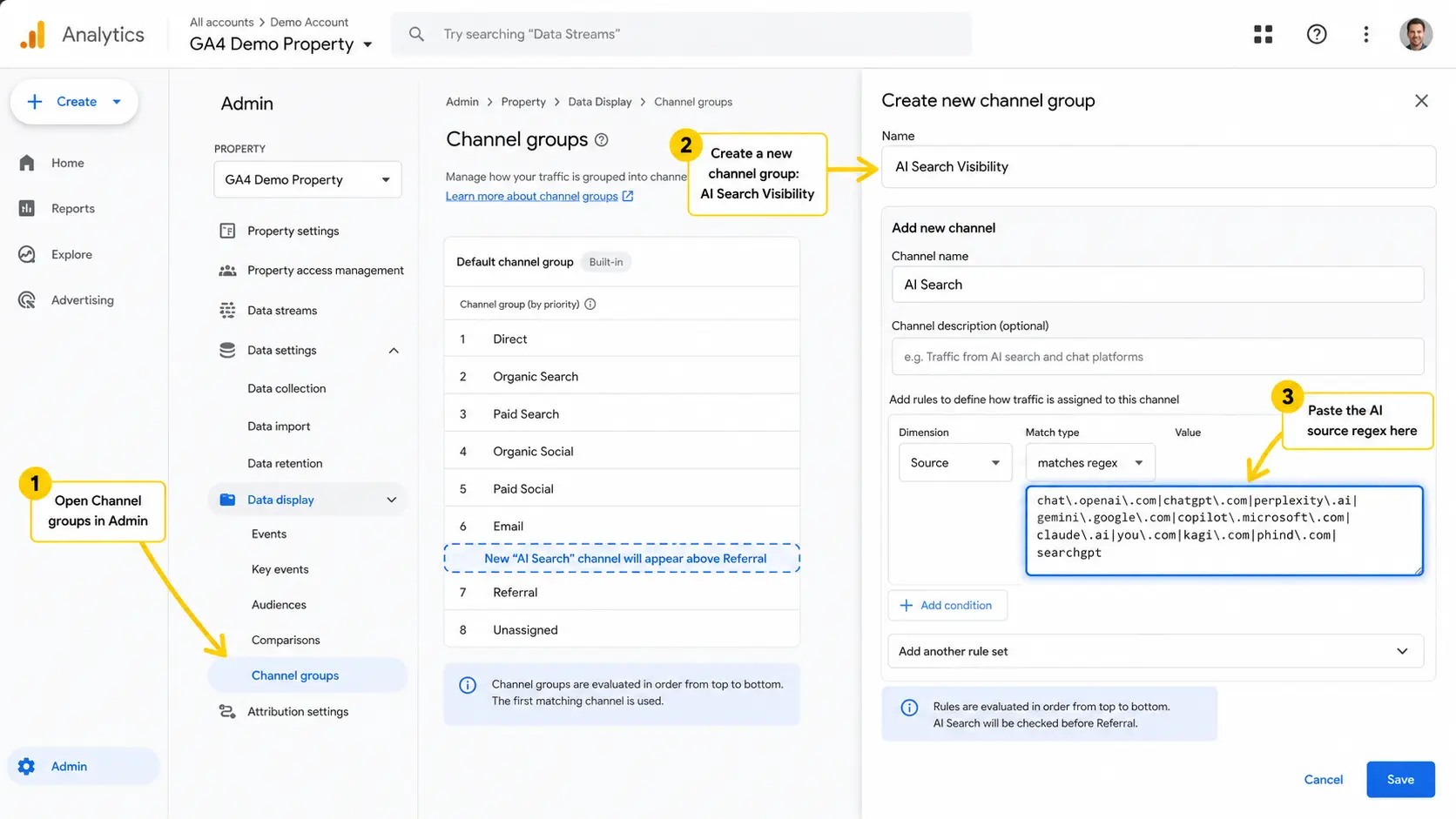
1. In GA4, go to Admin → Property → Data Display → Channel groups. 2. Click Create new channel group and name it "AI Search Visibility." 3. Click Add new channel and name it "AI Search." 4. Add a regex match on Source using this pattern:
chat\.openai\.com|chatgpt\.com|perplexity\.ai|gemini\.google\.com|copilot\.microsoft\.com|claude\.ai|you\.com|kagi\.com|phind\.com|searchgpt5. Save the channel and move it above Referral in priority order so the rule fires first.
This single change re-attributes 60 to 70 percent of your AI traffic that was previously buried in Referral. The remaining 30 percent, from in-app browsers and stripped referrers, needs a different approach covered in the next step.
Step 2: Capture Hidden AI Traffic With Page-Level Detection
When AI traffic arrives with no referrer, GA4 cannot tag it as AI. But your content can. The trick: detect the user agent or query parameters that AI clients append, then send a custom event.
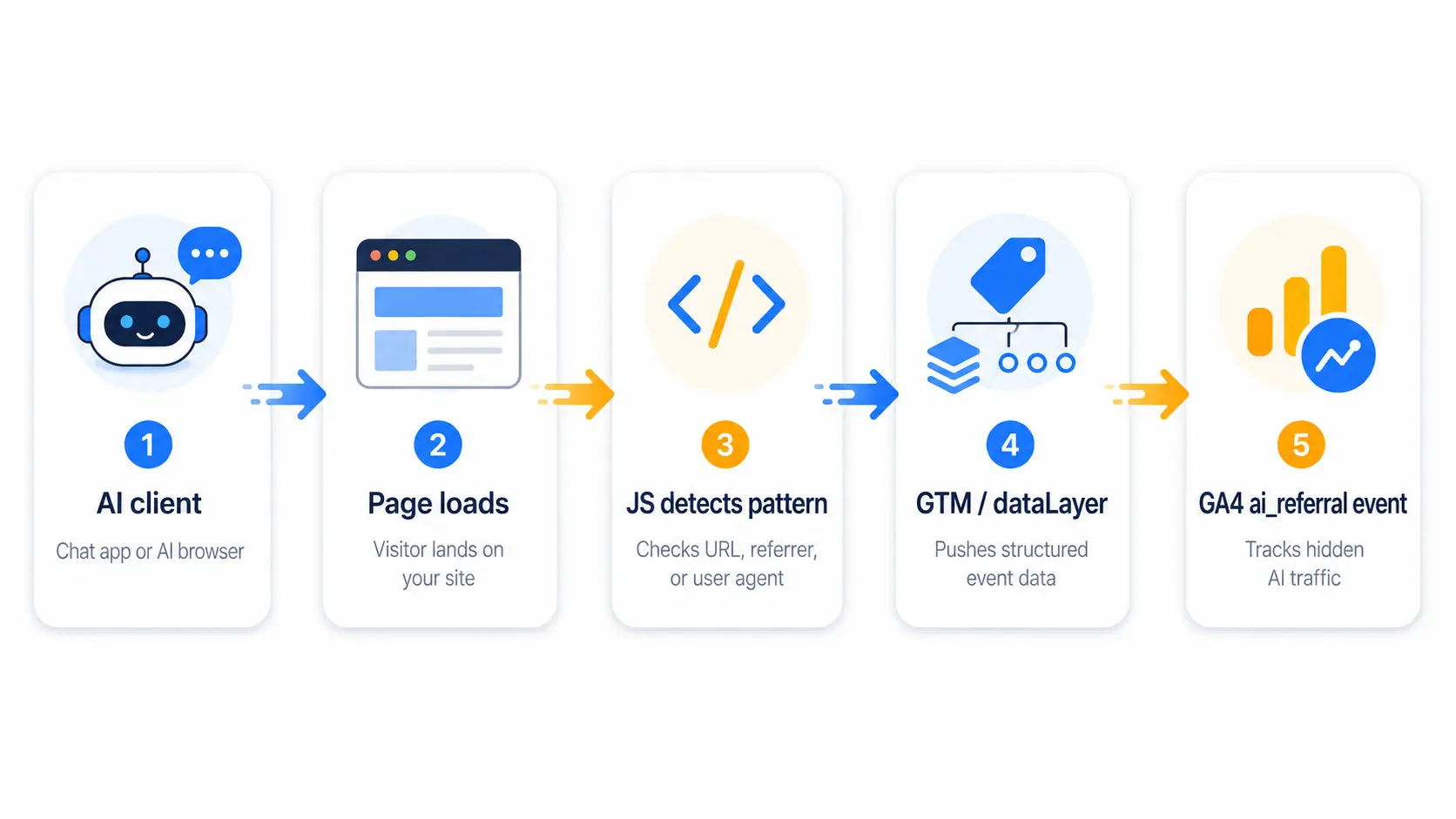
Most AI assistants and browsers append identifiable strings to the URL when they cite a page. Common patterns include:
?utm_source=chatgpt.comwhen ChatGPT cites with a tracking parameter?ref=perplexityfrom Perplexity-driven clicks- User-Agent strings containing `GPTBot`,
OAI-SearchBot, `PerplexityBot`,ClaudeBot, orGoogle-Extended - The
noaiquery parameter that some agentic browsers pass through
Add a small script to your site or push a custom event from Google Tag Manager that fires an ai_referral event when any of these patterns are detected. Then build a GA4 exploration that segments traffic by that event. This is the kind of implementation work our analytics and reporting team handles for every client running content for AI visibility.
Step 3: Add UTM Parameters Everywhere You Can Influence
You cannot control how ChatGPT cites you, but you can control what links you publish elsewhere. Every link to your site that lives on a platform AI scrapes, such as Reddit, LinkedIn, Quora, Wikipedia, and partner publications, should carry UTM parameters that survive when AI uses them as a citation source.
Example of a properly tagged link:
https://yoursite.com/services?utm_source=ai_search&utm_medium=referral&utm_campaign=geo_2026When an AI tool eventually surfaces that link, the UTM stays intact, and GA4 logs it correctly. Over time, this builds a measurable picture of how much AI exposure converts to traffic from each source platform. Pair this with a strong content marketing program and you start seeing exactly which off-site assets fuel your AI citations.
Step 4: Track AI Traffic in Google Search Console
GA4 measures clicks that land on your site. Search Console measures impressions and clicks within Google properties, including AI Overviews and AI Mode. These are two different halves of the same picture and you need both.
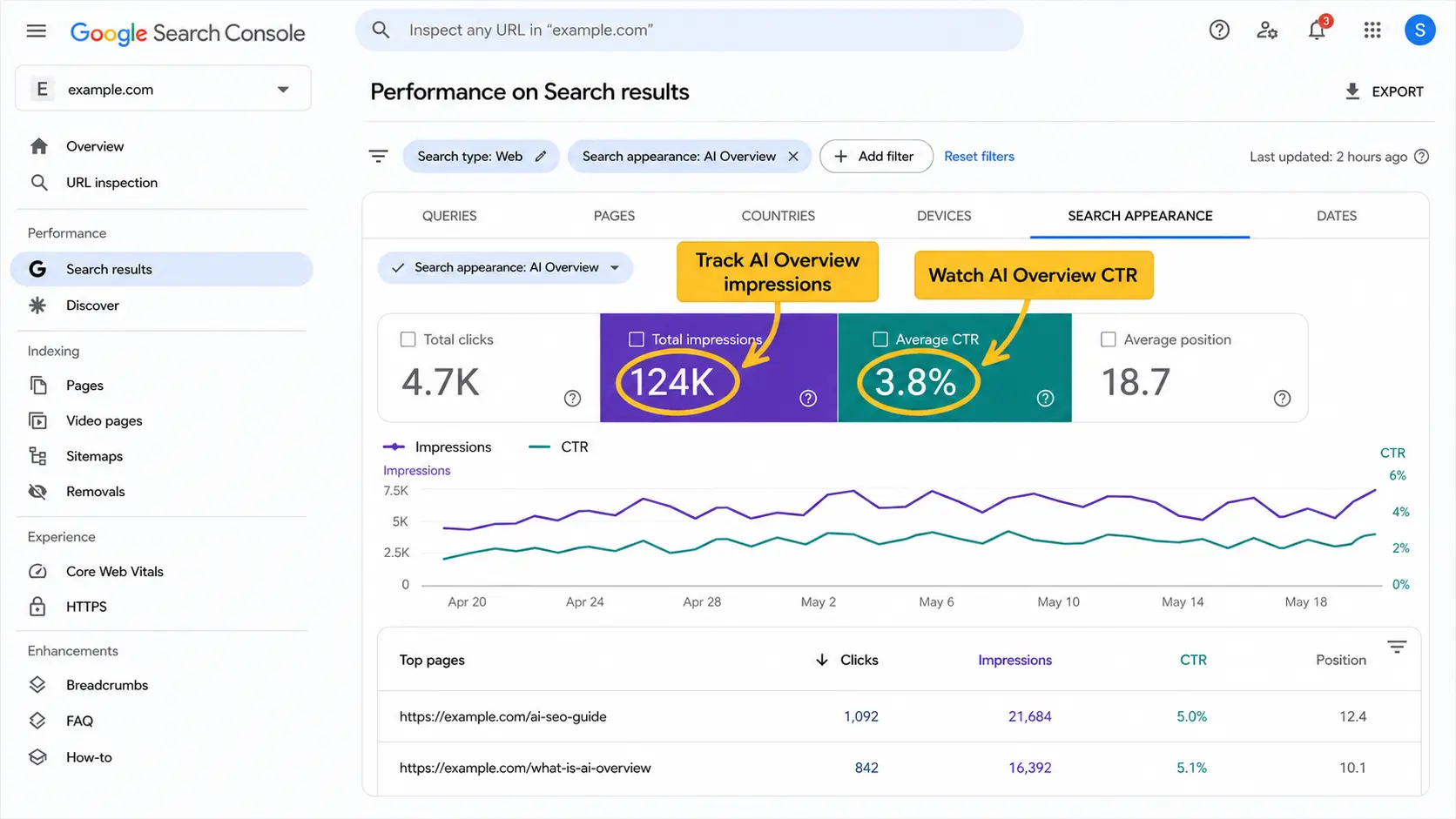
In 2026, Google Search Console exposes three new metrics that did not exist eighteen months ago:
- AI Overview impressions when your page is cited in an AIO
- AI Mode impressions when your page appears in conversational AI Mode
- Click-through rate from both surfaces
These are reported under Performance → Search results → Search appearance. They are the closest thing to a "rank in AI Overviews" metric currently available. Pair them with your GA4 AI Search channel to see the full pipeline: AIO citation, then click, then landing, then conversion. If you are not yet investing in technical SEO and structured content for AIO citation, this report will show you exactly why you should be.
Step 5: Build an AI Visibility Dashboard in Looker Studio
AI Traffic Distribution Across Platforms in 2026
*Source: Devimus client benchmarks, January–April 2026.*
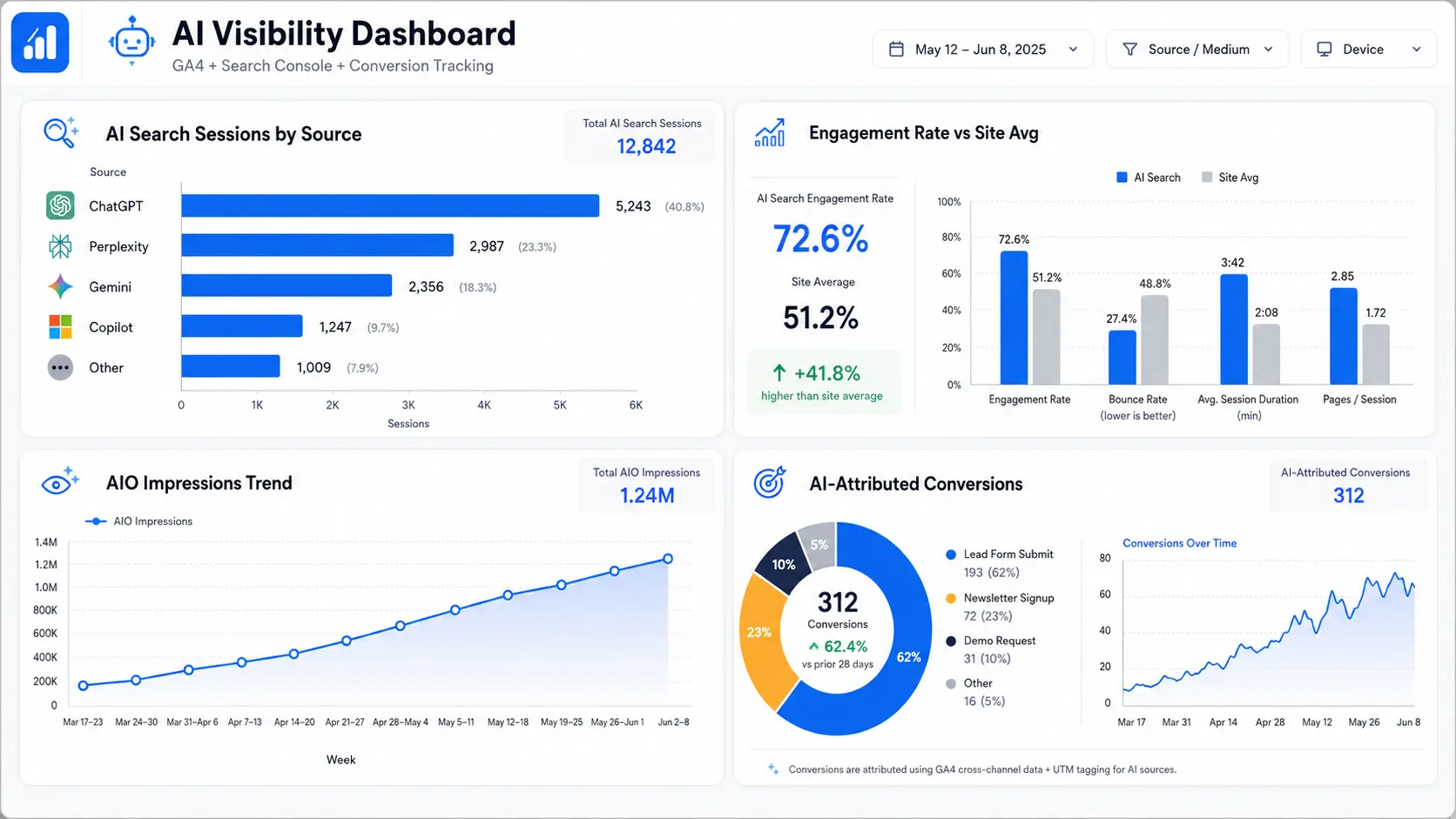
A single dashboard that pulls together GA4 (AI Search channel), Search Console (AI Overview impressions), and your CRM (leads attributed to AI traffic) gives you the only honest view of AI search performance available today. The four widgets we recommend on every client dashboard:
1. AI Search sessions by source with week-over-week trend 2. AI Search engagement rate vs site average, where AI traffic typically engages 1.5 to 2 times higher 3. AI Overview impressions from GSC as a leading indicator of citation growth 4. Conversions attributed to AI Search channel, which is the actual money number
The reason this dashboard matters: it converts the abstract "AI is reshaping search" narrative into specific revenue numbers that justify continued investment. Without it, your AI and GEO program looks like a cost center. With it, you can prove ROI in board meetings.
What Good AI Traffic Numbers Look Like in 2026
| Metric | Sites with AI optimization | Sites without |
|---|---|---|
| Percent of total sessions from AI Search | 4 to 12 percent | Below 1 percent |
| AI Search engagement rate | 65 to 75 percent | Not measurable |
| AI Search conversion rate | 1.4 to 2.1x site average | Not measurable |
| AI Overview impressions per month | 50K to 500K | Below 2K |
| Brand search lift from AI exposure | 10 to 25 percent year over year | Flat |
*Source: Devimus client benchmarks, January–April 2026.*
If your AI Search channel is registering less than 1 percent of total sessions and you are publishing content, the gap is almost always implementation, not strategy. The AI traffic exists. Your tracking is hiding it.
Why This Matters for Your Business in 2026
Three reasons to fix this now, in priority order.
1. Budget defense. When organic traffic dips because zero-click AI answers replace clicks, your leadership team needs proof that you are still capturing demand somewhere. Without AI Search tracking, every AI Overview that saves the user a click looks like a loss. With it, you can show the same user converting through your AI Search channel three days later.
2. Channel optimization. If 8 percent of your traffic and 15 percent of your conversions come from AI Search, you should be doubling your investment in content writing and AI SEO. You cannot make that decision without the data.
3. Competitive intelligence. Tracking which pages get cited through the GSC AI Overview report tells you exactly which content earns AI authority. Replicate the patterns that work. Deprecate the ones that do not. This data is also the basis for credible reporting if you are working with a search engine optimization partner or considering hiring one.
Common Mistakes We See in 2026 GA4 Audits
After auditing dozens of GA4 implementations this year, the same five mistakes appear almost every time:
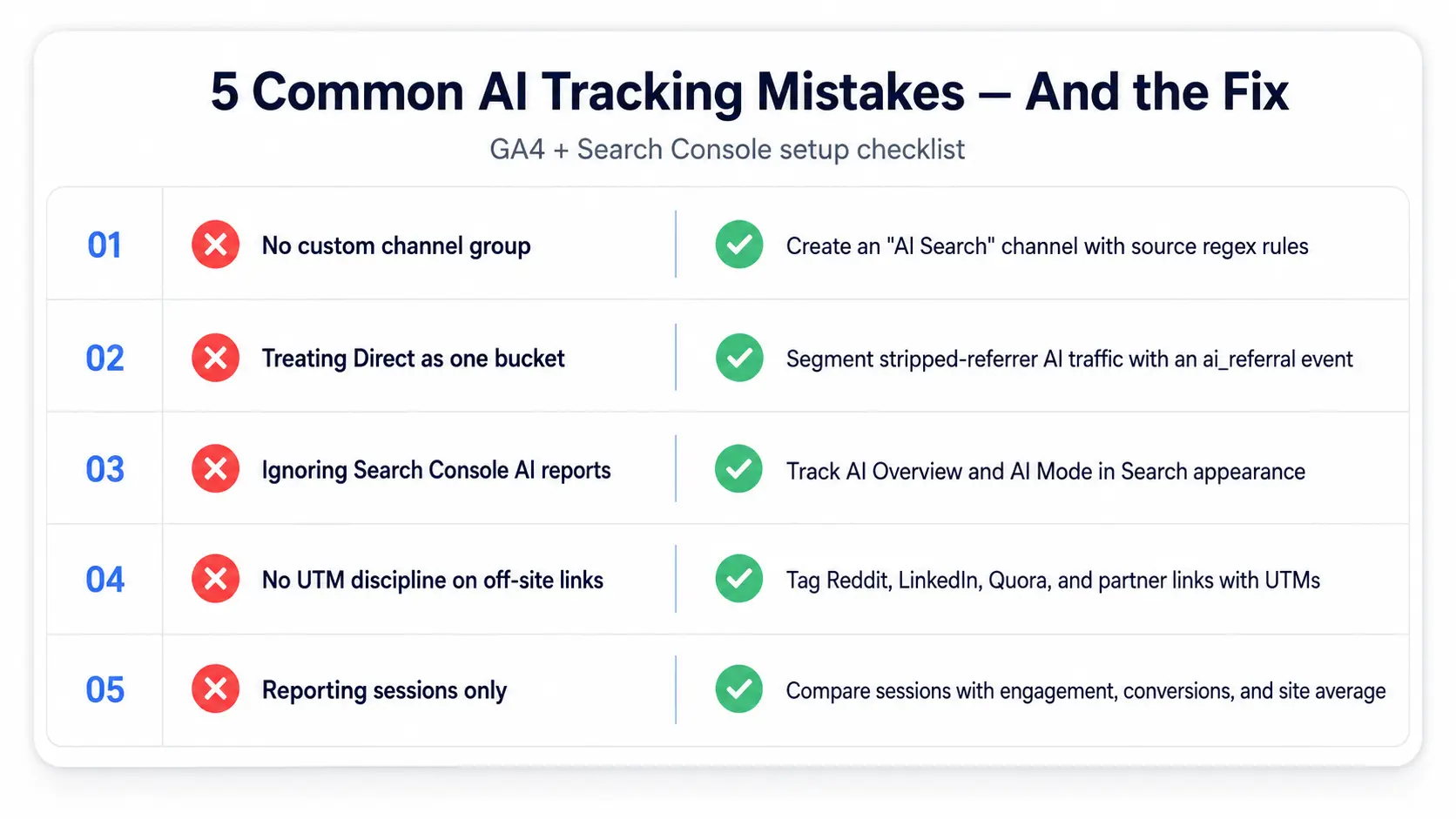
- No custom channel group, which leaves AI traffic buried under Referral indefinitely
- Treating "Direct" as a single bucket, when a significant chunk of Direct is actually stripped-referrer AI traffic that should be segmented separately
- Ignoring Search Console's new AI reports, with most teams not having even looked at the AI Overview impression data
- No UTM discipline, so links published to Reddit, LinkedIn, and partner sites carry no tracking and AI citations lose all attribution
- Reporting AI traffic in absolute terms only, where "we got 500 AI Search sessions" means nothing without engagement and conversion metrics measured against site average
Fixing all five takes one focused afternoon. The data they unlock changes how you allocate marketing budget for the next twelve months.
Getting Started: A 30-Minute Setup
If you only have thirty minutes today, do this:
1. Minutes 0 to 10: Create the custom channel group in GA4 using the regex from Step 1. 2. Minutes 10 to 20: Open Search Console, navigate to Performance, then Search Appearance, and bookmark the AI Overview report. 3. Minutes 20 to 30: Add UTM parameters to your three most-shared pages on Reddit, LinkedIn, and any partner sites.
Come back in thirty days. Your AI Search channel will have real data, your AIO impressions will give you a benchmark, and your UTM links will be paying off. From there, the optimization compounds.
If you want this set up properly across an entire site, with custom events, dashboards, and integration into your CRM, our analytics and reporting and digital marketing teams handle full GA4 instrumentation for AI search attribution. Contact us for a free analytics audit and we will show you exactly how much AI traffic your site is currently missing.