


Structured data is code you add to your pages that tells search engines and AI models exactly what your content means — not just that a page has words on it, but that *this* is a product, it costs €49, and it has a 4.8-star rating from 212 reviews. In 2026 it does two jobs at once: it earns you rich results in Google (star ratings, prices, FAQs, images) that lift click-through, and it hands the AI engines — Google AI Overviews, ChatGPT, Gemini, Perplexity — the clean, unambiguous facts they need to understand and cite your business. For a small business, it is one of the highest-ROI technical wins on the table.
This guide explains structured data for business owners, not developers. You will learn what schema.org and JSON-LD are, which schema types are worth your time, how rich results and AI citations actually work, the mistakes that get markup ignored (or penalised), and how to validate everything before it goes live. If you have already read our SEO guide for 2026, treat this as the technical layer that makes the rest of your SEO machine-readable.
What Structured Data Actually Is (In Plain English)
Structured data is a standardised vocabulary you add to your HTML that labels the meaning of your content so machines can read it without guessing. A human sees "€49" and knows it is a price. A search engine sees a string of characters. Schema markup removes the guesswork by explicitly tagging that number as price, the stars as aggregateRating, and the block of text as an FAQPage.
The vocabulary comes from schema.org, a shared standard backed by Google, Microsoft, Yahoo, and Yandex. Think of it as a dictionary of "types" — Organization, Product, Article, LocalBusiness, FAQPage — each with defined properties. You describe your page using those types, and every major engine understands the same labels. It is the difference between handing someone a pile of facts and handing them a filled-in form.
You do not need to mark up everything. You need to mark up the things that describe your business and drive decisions: who you are, what you sell, what it costs, what customers think, and the questions buyers ask.
Why Schema Matters More in 2026: Rich Results and AI Citations
For years, schema markup was a "nice to have" that could earn you a star rating in search. Two shifts made it essential.
First, rich results became the norm, not the exception. A plain blue link now competes against results with star ratings, prices, images, FAQ accordions, and breadcrumbs. Pages without markup look bare next to pages that have it — and bare listings get fewer clicks even when they rank in the same position.
Second, AI engines run on structured facts. When Google AI Overviews, ChatGPT, or Perplexity assemble an answer, they favour sources whose facts are explicit and verifiable. Structured data gives a model an unambiguous statement — "this business is open until 18:00, rated 4.8, located in Milano" — instead of forcing it to infer that from prose. Clean facts are easier to trust, and easier to trust means easier to cite. This is the same principle behind everything in our guide to getting found on ChatGPT and AI Overviews: make your business machine-readable, and machines will recommend it.
Schema does not directly rank you higher — Google has been clear it is not a ranking factor on its own. What it does is make you eligible for features and citations that dramatically change how often, and how well, you get seen.
The Highest-Value Schema Types
You could spend weeks mapping every schema.org type. Do not. A handful cover the vast majority of the value for most businesses.
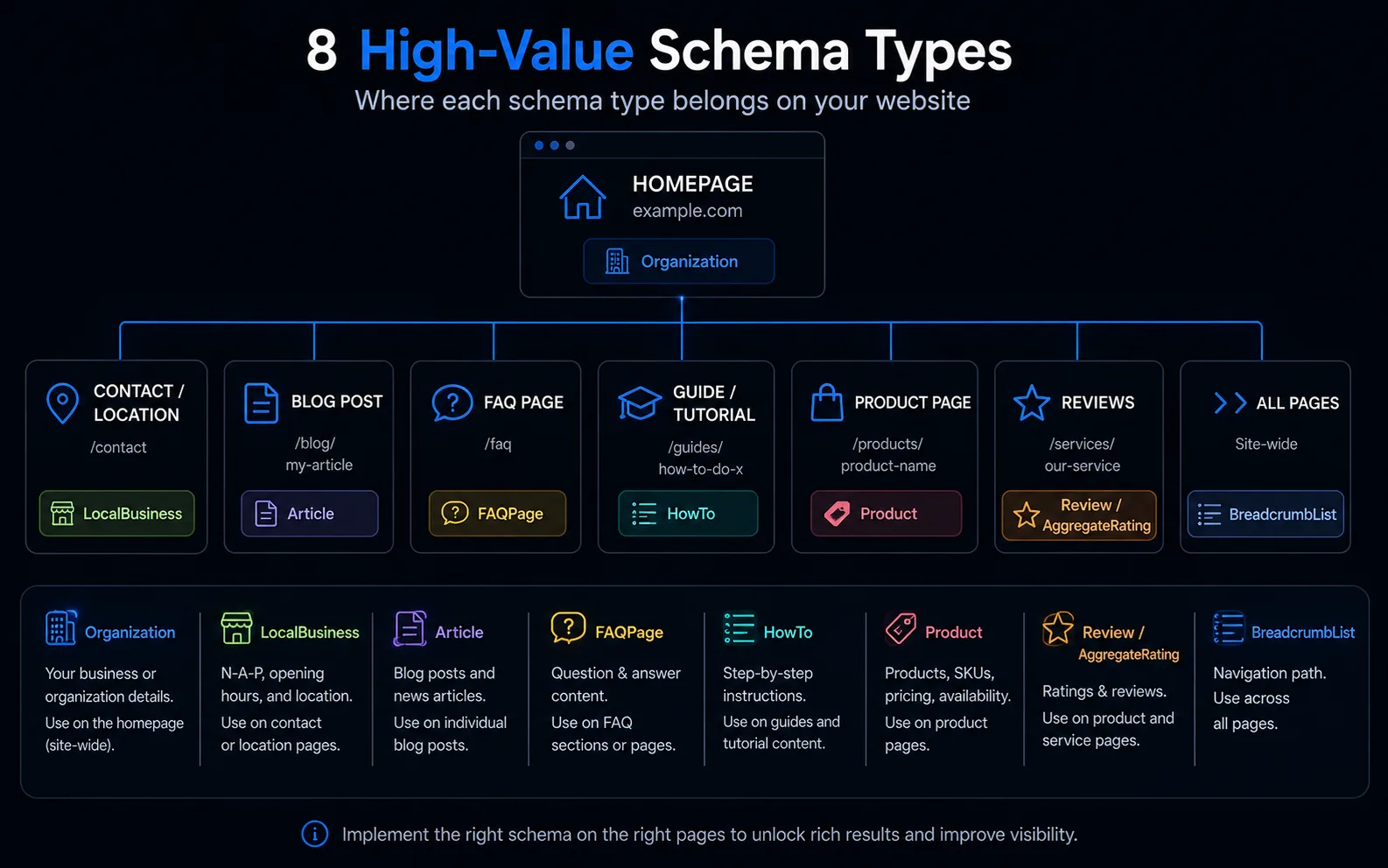
Organization — Your company identity: name, logo, URL, social profiles, contact points. Add it once, site-wide, usually on the homepage. It anchors your brand in Google's Knowledge Graph and helps AI engines connect mentions of you across the web.
LocalBusiness — The single most valuable type for anyone with a physical location or service area. Marks up your address, phone, opening hours, geo-coordinates, and price range. This is the record AI engines lean on hardest for "near me" answers, so pair it with your local SEO work.
Article — For blog posts and news: headline, author, publish and modified dates, featured image. It supports Top Stories and rich article treatment, and it signals authorship — an E-E-A-T cue AI engines increasingly weigh.
FAQPage — Marks up genuine question-and-answer content. It is exceptionally friendly to AI extraction because the format already matches how models quote answers. Only mark up FAQs that are actually visible on the page.
HowTo — Step-by-step instructions with tools, time, and ordered steps. Ideal for tutorials and process pages, and a natural fit for the way AI engines summarise "how do I…" queries.
Product — Name, description, price, availability, and images for anything you sell. Combined with reviews, it unlocks the price-and-stars listings that dominate shopping-intent searches.
Review / AggregateRating — The star ratings that lift click-through more than almost any other feature. AggregateRating summarises many reviews into an average and count. It must reflect real, verifiable reviews — more on that below.
BreadcrumbList — Marks up your navigation path so Google shows a clean "Home › Services › Web Design" trail instead of a raw URL. Small, but it improves how professional your listing looks and how well engines understand your site structure.
How Rich Results Boost Click-Through
Rich results work because attention is scarce. On a results page crowded with options, the listing with four gold stars, a price, and a thumbnail wins the eye before anyone reads a headline.
The effect is measurable. Depending on the query and industry, rich results commonly lift click-through rate by 20-40% versus a plain listing in the same position. For a product page, star ratings plus a visible price can be the difference between a click and a scroll-past. For a recipe or how-to, an image and time estimate do the same job.
Crucially, this is free real estate. You are not paying for placement — you are making an existing ranking work harder by dressing it in the information buyers use to decide. That is why schema belongs in the same conversation as on-page SEO: both are about earning the click you already ranked for.
How Structured Data Powers GEO and AI Overviews
Generative Engine Optimization (GEO) — getting cited by AI engines — leans on structured data even harder than classic search does.
When an AI model builds an answer, it is essentially assembling verified facts and attributing them to trustworthy sources. Structured data serves those facts on a plate. A LocalBusiness block states your hours and rating without ambiguity. An FAQPage hands the model a ready-made question-and-answer pair it can quote almost verbatim. A Product block confirms the price so the model does not risk quoting a stale number.
The pattern is consistent across engines: explicit, structured, verifiable content gets cited; vague prose gets skipped. Schema will not, by itself, make an AI recommend you — reviews, authority, and consistency still matter, as we cover in our AI SEO work. But it removes the single biggest reason a model hesitates: uncertainty about what your page actually claims. Combined with strong technical SEO, it makes your site one of the easy, safe sources for a model to lean on.
JSON-LD vs Microdata: Which to Use
There are two main ways to add schema. Microdata weaves attributes directly into your visible HTML tags. JSON-LD is a separate block of code — a tidy little script — that sits in the page and describes it without touching the layout.
Use JSON-LD. It is what Google recommends. It keeps your markup in one clean block, separate from your content, so it is easy to read, edit, and validate. It does not break when a designer changes the page. And it is what nearly every CMS, plugin, and framework generates today. Microdata still works, but it is fiddly, harder to maintain, and offers no advantage for new projects.
Here is a compact, valid JSON-LD example for a local business with reviews — the kind of block that lives in the <head> of a page:
{
  "@context": "https://schema.org",
  "@type": "LocalBusiness",
  "name": "Rossi Plumbing",
  "telephone": "+39 06 1234567",
  "url": "https://rossiplumbing.it",
  "address": {
    "@type": "PostalAddress",
    "streetAddress": "Via Roma 10",
    "addressLocality": "Milano",
    "postalCode": "20100",
    "addressCountry": "IT"
  },
  "aggregateRating": {
    "@type": "AggregateRating",
    "ratingValue": "4.8",
    "reviewCount": "212"
  }
}
That single block tells every engine your name, contact details, address, and a real 4.8-star rating from 212 reviews. Notice how nothing is left to interpretation.
Common Schema Mistakes (and Google's Guidelines)
Schema is powerful, but sloppy markup gets ignored — and dishonest markup gets you a manual penalty. Avoid these:
- Marking up content that is not visible on the page. Google's rule is firm: structured data must describe content a visitor can actually see. Do not add FAQ schema for questions that appear nowhere on the page.
- Fake or self-serving reviews. Never invent ratings, mark up reviews you wrote about yourself, or aggregate ratings from other sites as if they were yours. This is the fastest way to earn a structured-data manual action.
- Wrong or mismatched types. Using
Productschema on a service page, or a rating that does not match what users see, confuses engines and can disqualify your rich result.
- Incomplete required properties. Each type has required fields. A
Productwithout a price or aRecipewithout ingredients simply will not generate a rich result.
- Orphaned or duplicated markup. Two conflicting
Organizationblocks, or schema left behind after a redesign, sends mixed signals. Keep one clean source of truth.
The overarching principle from Google is simple: structured data must be accurate, honest, and reflect the visible page. Treat it as documentation of reality, not a place to embellish.
How to Validate Your Schema
Never ship schema you have not tested. Two free tools do the job.
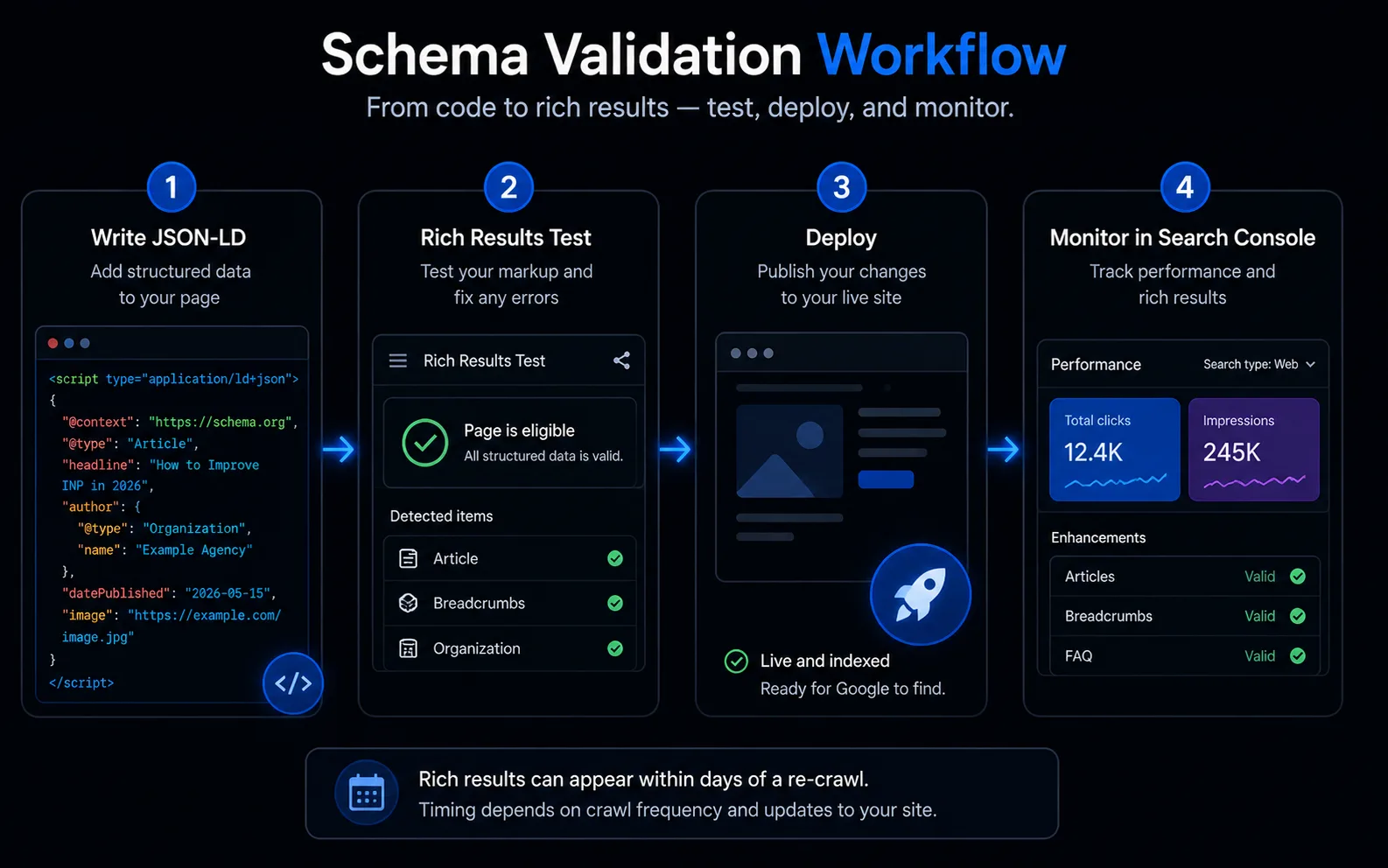
1. Google's Rich Results Test. Paste a URL or code snippet and it tells you which rich results the page is eligible for, plus any errors or warnings. This is your first check — it reflects what Google specifically supports.
2. The Schema Markup Validator (schema.org). This checks your markup against the full schema.org standard, not just Google's rich-result subset. Use it to confirm your syntax is valid and your properties are correct.
3. Google Search Console. Once live, Search Console reports on your structured data at scale — which items are valid, which have errors, and how enhancements are performing across your whole site. It is where you catch problems that only appear once real pages are indexed.
A simple workflow: write the JSON-LD, run it through the Rich Results Test, fix errors, deploy, then monitor Search Console over the following weeks. Rich results can appear within days of Google re-crawling the page.
Where to Start
You do not need to mark up your entire site this week. Start where the return is highest: add Organization and LocalBusiness schema to your homepage, Product and Review schema to your top revenue pages, and FAQPage to pages that answer real customer questions. Validate each one, then expand.
Done right, structured data quietly compounds: better-looking listings, higher click-through, and a business that AI engines find easy to understand and safe to cite. If you would rather have it implemented and validated correctly the first time, our team handles schema as part of every technical SEO engagement — request a free estimate and we will map the highest-value markup for your site.