


A slow website quietly costs you customers every single day. In 2026, Google measures your speed with three Core Web Vitals — LCP, INP, and CLS — and uses them as a ranking signal, while your visitors use them to decide whether to stay or bounce. Get all three into the "Good" range and you win on two fronts at once: better positions in search and more of your traffic actually converting into revenue.
This guide skips the engineering jargon. It explains what each metric measures, what score you should be aiming for, how to check your own site in ten minutes, and the concrete fixes that move the needle. Pay special attention to INP — it replaced FID in March 2024, it is the newest and least understood of the three, and it is where most sites are quietly failing.
Why Page Speed Is a Money Problem, Not Just a Tech Problem
Speed is not a vanity metric. It sits directly on top of your two most important business outcomes: how often you rank, and how often visitors buy.
On the ranking side, Core Web Vitals are a confirmed Google ranking signal. They rarely outrank great content on their own, but when two pages are otherwise close, the faster one wins — and on mobile, where most searches happen, the gap is often decisive. Poor scores also drag down crawl efficiency and the overall quality impression Google forms of your site.
On the revenue side, the numbers are blunt. Google's own research has repeatedly shown that as page load time climbs from 1 to 3 seconds, the probability of a bounce rises sharply, and each additional second of delay measurably erodes conversion rate. For an e-commerce store or a lead-gen site, shaving a second off load time and eliminating input lag can lift conversions by a meaningful margin — often the difference between a profitable and an unprofitable ad campaign.
If you are weighing a website redesign or budgeting a new build, treat speed as a revenue line item, not a nice-to-have. Our website cost guide breaks down where that budget actually goes.
The Three Core Web Vitals, in Plain English
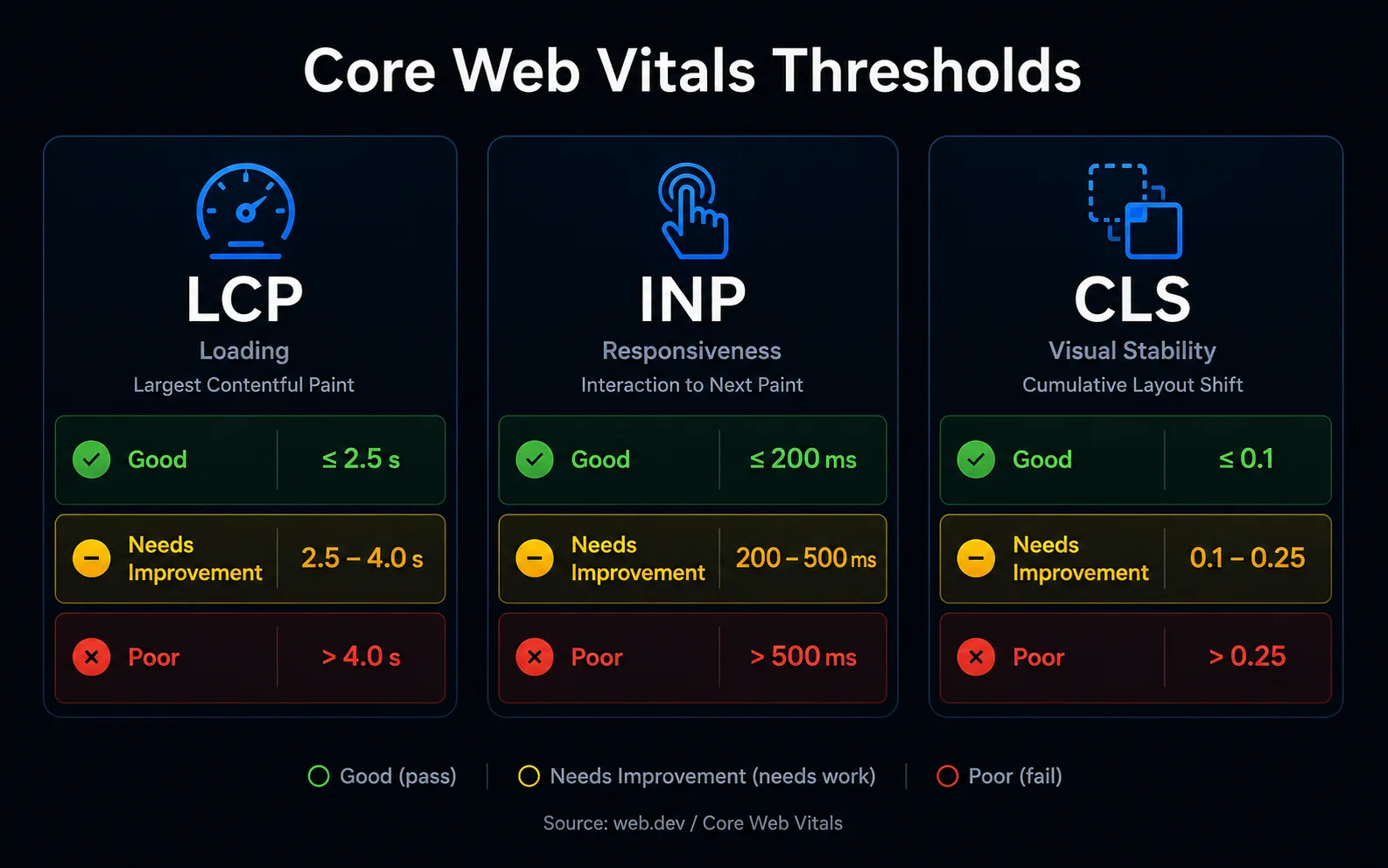
Each metric answers a simple human question a visitor asks in the first few seconds on your page.
LCP — "Did the main content load fast?"
Largest Contentful Paint measures how long it takes for the biggest visible element — usually your hero image, headline, or main banner — to render. It is your loading-speed metric.
- Good: 2.5 seconds or less
- Needs improvement: 2.5 to 4.0 seconds
- Poor: over 4.0 seconds
LCP is measured at the 75th percentile of your real visitors, meaning 75% of page loads must beat the threshold. A fast connection in your office does not count — Google grades you on what your actual audience experiences.
INP — "Did the page respond when I tapped or clicked?"
Interaction to Next Paint measures responsiveness. Every time a user taps a button, opens a menu, or types in a field, INP records how long the page takes to visually respond. It reports the worst (or near-worst) interaction across the whole visit, so one janky moment can sink your score.
- Good: 200 milliseconds or less
- Needs improvement: 200 to 500 milliseconds
- Poor: over 500 milliseconds
This is the metric that replaced First Input Delay (FID) on 12 March 2024. FID only measured the delay before the browser started processing the very first interaction — a low bar most sites passed. INP is far stricter: it measures the full time from interaction to the next visual update, across every interaction on the page. Sites that comfortably passed FID are now failing INP, which is why it deserves its own section below.
CLS — "Did the page stay still while I read it?"
Cumulative Layout Shift measures visual stability. If a button jumps just as you go to tap it, or an ad pushes the article down while you read, that is layout shift — annoying and, on checkout pages, expensive.
- Good: 0.1 or less
- Needs improvement: 0.1 to 0.25
- Poor: over 0.25
CLS is a unitless score, not a time. The common causes are images without set dimensions, ads and embeds that load late, and web fonts that swap in and reflow the text.
How to Diagnose Your Site in Ten Minutes
You do not need a developer to find out where you stand. Three free Google tools give you the full picture, and they answer two different questions: how one page performs in a lab test, and how all your real visitors actually experience the site.
PageSpeed Insights — the fast single-page check
Go to PageSpeed Insights, paste in a URL, and read the top of the report first. If it shows a section titled "Discover what your real users are experiencing," that is CrUX field data — real Chrome-user measurements from the last 28 days, and the numbers Google actually uses for ranking. The lab score below it (Lighthouse) is a simulation useful for debugging, but the field data is the verdict.
Search Console — your whole site at a glance
Google Search Console has a Core Web Vitals report that groups every URL on your site into Good, Needs Improvement, and Poor buckets, split by mobile and desktop. This is the fastest way to see whether a problem is one bad page or a site-wide template issue. Fix the template and you fix hundreds of URLs at once. If you do not have Search Console set up, that is step one of any serious technical SEO effort.
CrUX — the field-data source of truth
Both tools above pull from the Chrome User Experience Report (CrUX), Google's public dataset of real-world performance from opted-in Chrome users. Lab tools estimate; CrUX records what happened. When lab and field disagree, trust the field data — it reflects your actual audience on their actual phones and networks.
Fixing LCP: Make the First Thing Fast
LCP problems almost always trace back to a heavy or slow-loading hero. Work through these in order.
- Compress and modernize the hero image. Serve WebP or AVIF, size it to the space it fills, and never ship a 4000px image into a 800px slot. This single fix resolves a large share of LCP failures.
- Preload the LCP element so the browser fetches it early instead of discovering it late.
- Upgrade your hosting or add a CDN. A slow server response time (TTFB) caps how fast LCP can ever be. Cheap shared hosting is a frequent hidden culprit.
- Remove render-blocking resources. Defer non-critical CSS and JavaScript so the browser can paint the main content without waiting.
If your hosting or platform is the bottleneck, a rebuild on modern custom websites or a focused web development engagement usually pays for itself in performance alone.
Fixing INP: The 2026 Priority
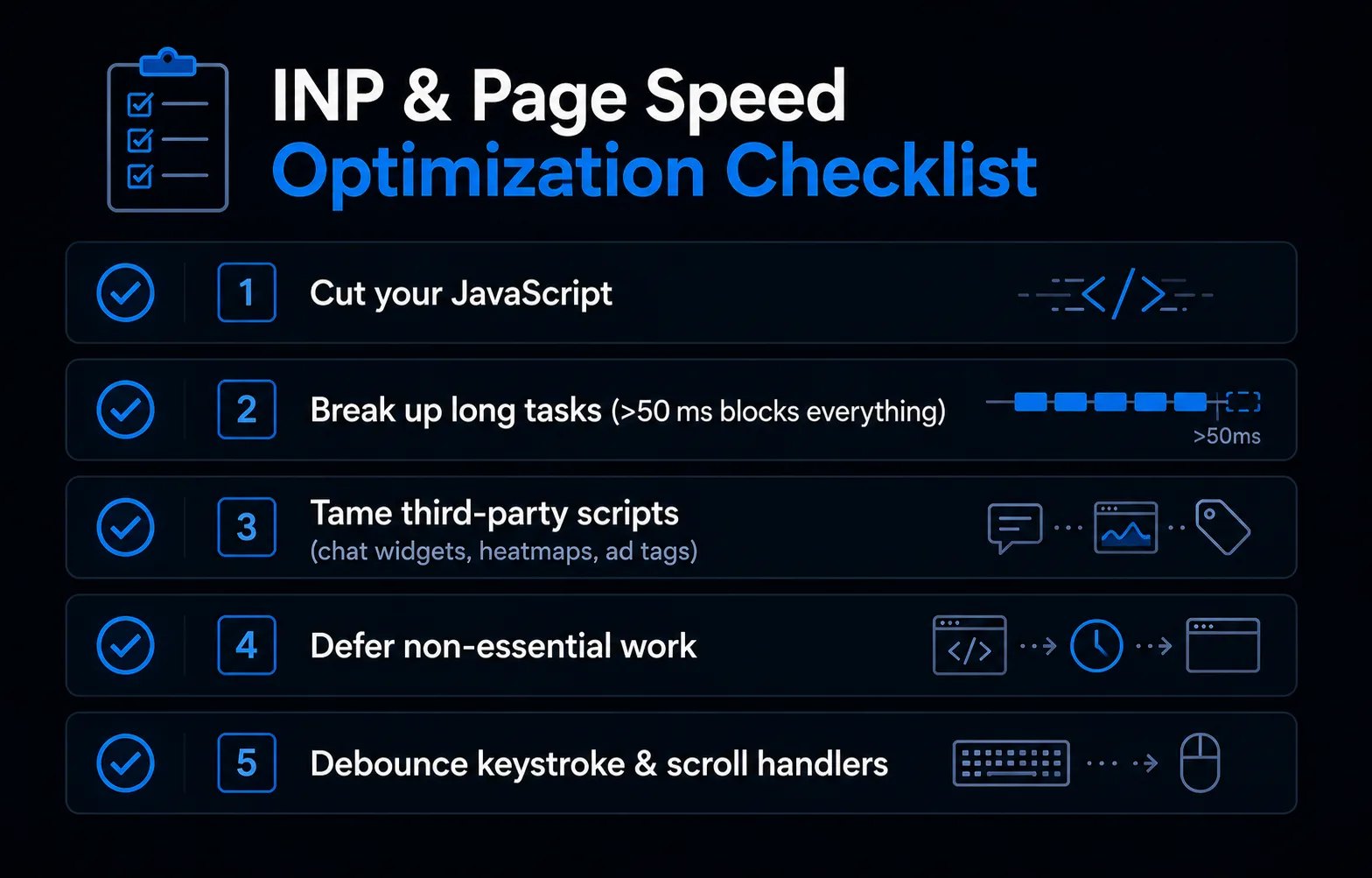
INP is a JavaScript problem far more than an image problem. When a user taps and nothing happens for half a second, it is almost always because the browser's main thread is busy running scripts and cannot respond. Here is the checklist that fixes most sites.
- Cut your JavaScript. Less code on the main thread means faster responses. Audit what you actually need and remove the rest.
- Break up long tasks. Any single script that runs longer than 50 milliseconds blocks every interaction behind it. Splitting heavy work into smaller chunks lets the browser respond in between.
- Tame third-party scripts. Chat widgets, heatmaps, A/B testing tools, and especially bloated analytics and ad tags are the number-one INP killers. Load them after interaction, remove the ones nobody uses, and question every new tag before you add it.
- Defer non-essential work. Push analytics events, tracking, and cosmetic animations to run after the page has responded to the user, not before.
- Avoid heavy work on every keystroke or scroll. Debounce or throttle handlers that fire constantly so they do not flood the main thread.
- Reserve space and give instant feedback. Show a pressed state or spinner the instant a user acts, so the interface feels responsive even while work completes.
The common thread: INP rewards a lean, disciplined front end. Sites stuffed with plugins and marketing tags almost always fail it, which is why heavy platforms and page builders struggle here. A clean build is the durable fix.
Fixing CLS: Stop the Jumping
Layout shift is usually the easiest of the three to fix, and the fixes are cheap.
- Always set width and height (or a reserved aspect ratio) on images, videos, and embeds so the browser holds their space before they load.
- Reserve space for ads and dynamic content with fixed containers instead of letting them push content around when they arrive.
- Preload fonts and use
font-display: optionalor matched fallbacks so text does not reflow when the web font swaps in. - Inject banners and notices above the fold carefully — a cookie bar that shoves the whole page down is a classic CLS offender.
Speed, Rankings, and Revenue: How It All Connects
Here is the honest hierarchy. Great content and clear relevance still win rankings first — speed will not rescue a thin page. But among capable pages, Core Web Vitals are a genuine tiebreaker, and they compound with everything else in your SEO strategy. A fast site gets crawled more efficiently, keeps visitors longer, and sends the engagement signals Google reads as quality.
Revenue is where the effect is most visible and most immediate. Faster LCP means fewer people abandon before your page even appears. Better INP means checkout buttons, filters, and forms respond instantly instead of feeling broken. Lower CLS means fewer mis-taps and fewer rage-quits at the worst possible moment. You do not have to choose between ranking better and converting better — Core Web Vitals move both at the same time.
Get Your Core Web Vitals Fixed
Start today: run your top three pages through PageSpeed Insights, read the field data, and note which of LCP, INP, or CLS is red. That tells you where to spend first. If the culprit is a heavy platform, bloated scripts, or a template problem across the whole site, the fix is structural — and that is exactly the kind of technical SEO and web development work we do every day.
Want a straight answer on what your site needs and what it would cost? Request a free estimate and we will audit your Core Web Vitals and tell you precisely where you are losing rankings and revenue to speed.